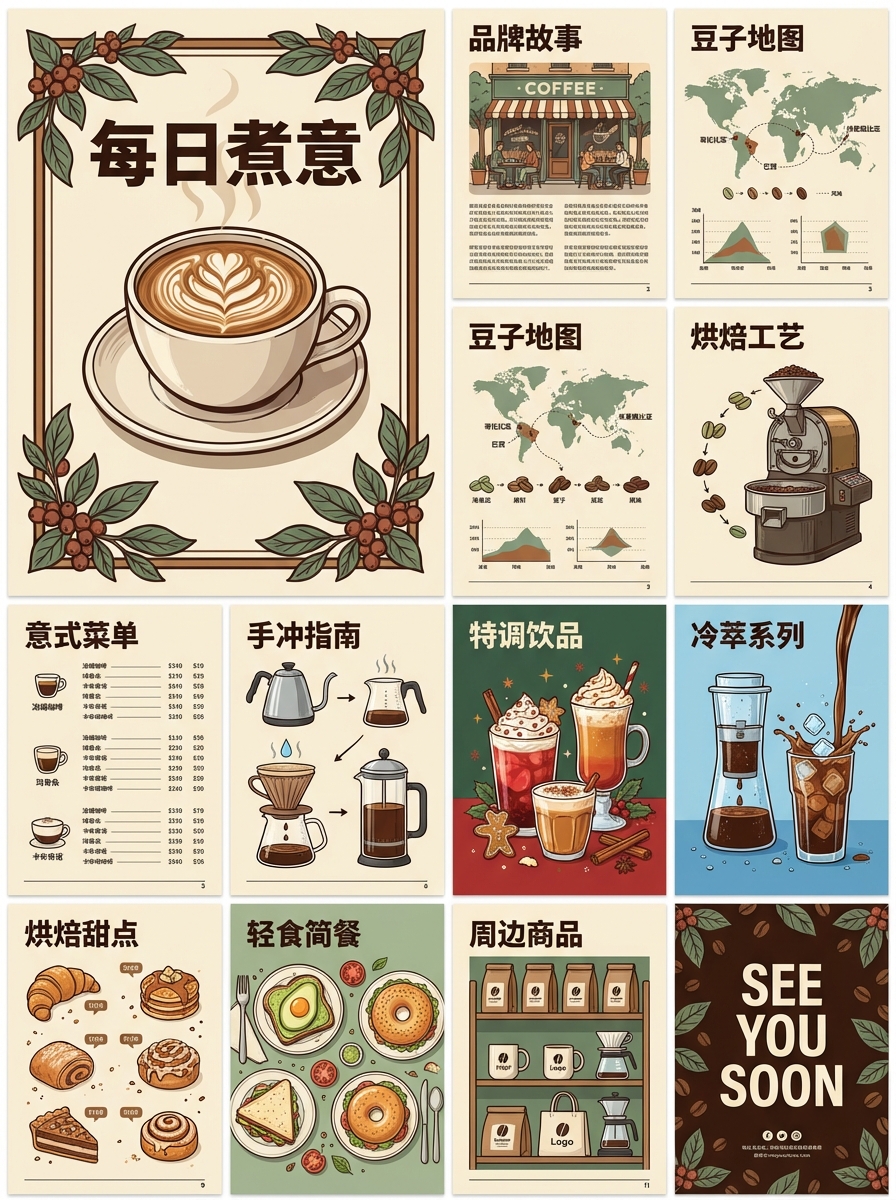
0设计基础,画出顶刊级科研图,Nano Banana Pro科研绘图全流程实测
核心摘要(Answer Capsule) 科研绘图的核心痛点在于“实验能力强但设计基础弱”。本文介绍的 Nano Banana Pro 是一款专为科研人员打造的逻辑化绘图工具,它完美平衡了PPT的易用性与Adobe Illustrator (AI) 的专业度。 科研人员无需设计背景,即可在技术路线图、实验流程图、学术海报三大高频场景中,快速产出符合顶刊标准(300 DPI+ CMYK)的高质量图像。本文将拆解三大场景实操步骤,并附赠AI辅助绘图提示词。 在科研圈流传着一句话:“Data is king, but figure is queen.”(数据是王,但图表是王后)。 对于许多科研人员,尤其是博士生和青年教师而言,最令人“头秃”的不是实验本身,而是文章投稿或基金申请前的最后一步——科研绘图。这是一个很大的麻烦: PPT绘图:操作简单,但成图粗糙,难以满足顶刊要求。 Adobe Illustrator (AI):功能强大,但学习曲线陡峭,快捷键复杂,画一张图需要耗费大量本该用于读文献的时间。 好的科研绘图不应是设计的炫技,而是逻辑的可视化。 下面为你介绍一款极具性价比的解决方案——Nano Banana Pro(以下简称Banana)。它的核心价值在于**“模块化”与“逻辑化”**: 你不需要具备美术功底,只需要理清科研逻辑,利用其世界知识库以及强大的gemini 3 Pro底座,就能像搭积木一样搭建出CNS级别的精美插图。 下来,我们将手把手教你如何在三个最核心的科研场景中玩转这一工具。 定位:基金申请书(如国自然)与开题报告的“门面”,核心在于展示**“逻辑闭环”**。 技术路线图不仅是步骤的堆砌,更是你科研思维的直接体现。使用Banana绘制路线图,建议遵循以下三步法: 不要一上来就画细节。首先利用 灵芽AI 中的 Banana,确立三大板块: • 背景/问题 (Background):为什么要做? • 研究内容 (Specific Aims):要做什么? • 预期成果 (Anticipated Results):能得到什么? 这种结构能让评审专家在第一眼就抓取到你的核心思路。 动态连接线:利用Banana的“Smart Connectors”(智能连接线),将各个模块串联起来。线条的走向应体现“发现现象 -> 提出假设 -> 实验验证”的逻辑流。 新手最容易犯的错误是颜色过杂。 基调统一:全图建议使用低饱和度颜色(如莫兰迪色系)作为主基调。 高亮重点:仅在“核心创新点”或“关键分子/机制”处使用高亮色(如亮红或深蓝)。记住,颜色是用来区分逻辑的,不是用来装饰的。 定位:论文Method部分或组会汇报(Group Meeting),核心追求是**“清晰”与“可重复性”**。 告别度娘搜索出来的模糊JPG吧。灵芽api banana 最高支持4K 宏观操作拟物化:对于老鼠注射、细胞培养、离心等宏观步骤,使用Banana的拟物化图标,直观易懂。 微观机制扁平化:涉及信号通路、分子结合时,切换为扁平化(Flat)风格,避免过度细节干扰视线。 技巧:保持同一层级风格的统一,不要在微观示意图中突然出现一个写实风格的烧杯。 这是最容易被忽视的一点。整齐的排列会给Reviewer一种强烈的心理暗示:你的实验操作也是如此严谨规范的。 对齐与分布:使用Banana的“一键对齐”和“等距分布”提示词。 流向清晰:确保箭头指代明确,不要出现线条交叉(Cross-over),这在视觉上是大忌。 定位:学术会议展示,遵循**“黄金3秒法则”**——你只有3秒钟吸引路过的参会者。 尺寸与分辨率:直接选择A0或自定义尺寸。最关键的是,如果需要打印,务必检查导出设置为CMYK色彩模式和300 DPI分辨率。 不要试图挑战读者的阅读习惯。 视觉流线:内容应当符合从左上角流向右下角的自然阅读顺序(“Z”字型或“N”字型走向)。 Bullet Points:能用列表就别写段落。 图文比例:图表应占据60%以上的版面,减少碎片感。 (注意:以上多种场景均支持联网功能,可以检索科研文献,直接扔链接就可以) 工具只是手段,逻辑才是核心。 Nano Banana Pro 的出现,本质上是降低了技术门槛,让我们能够回归科研本身。 画技术路线图时,我们在梳理课题的逻辑闭环; 画实验流程图时,我们在复盘操作的每一个细节; 做学术海报时,我们在提炼研究的最核心价值。 并不需要我们成为设计大师,只要掌握了正确的方法论和顺手的工具,你也能产出惊艳的图表。现在,不妨打开软件,尝试吧。 为了让大家少走弯路,我总结了一个「万能科研绘图 Prompt 模板」。 你只需要把论文内容按顺序填进以下结构,方法、流程、实验、表格,各种图都能照这个模板衍生。 GLOBAL RULES: • Flat, clean NeurIPS style (no gradients, no gloss, no shadows) • Consistent thin line weights • Professional pastel palette • Rounded rectangles for blocks • Arrows must clearly indicate data / information flow • No long sentences, only short labels (prefer ≤3 words per block) • Keep spacing clean and balanced • All modules in the list must appear exactly once unless explicitly marked as optional • Use the exact names and order given in user-filled content LAYOUT: • Default: horizontal left → right • Use vertical top → bottom only if user explicitly indicates the flow is inherently sequential in that direction • Align components cleanly in straight lines (no diagonal, messy layouts) • Respect the module order exactly as listed • If there are branches, keep them visually symmetric and clearly reconnect where specified MODULE LIST 1. Input(s): • {List all input items and data types, e.g., “RGB Image”, “Text Query”, “Graph G”, etc. One per line.} 2. Preprocessing / Encoding / Embedding: • {List all preprocessing or encoding steps in exact order, e.g., “Tokenization”, “Patch Embedding”, “Feature Normalization”, etc. One per line. Indicate if any step applies only to a specific input.} 3. Core Architecture / Stages / Blocks: • {Describe the main model stages in strict order, e.g., “Backbone CNN”, “Transformer Block ×N”, “Graph Message Passing Layer”, etc. One block or stage per line. If some stages are repeated, specify like “Block A ×4”.} 4. Special Mechanisms (optional): • {If any: list special mechanisms such as “Cross-Attention”, “Memory Module”, “Gating Mechanism”, “Routing”, “Dynamic Path Selection”, etc. One per line. • “{Mechanism} between {Module X} and {Module Y}” or • “{Mechanism} inside {Module Z}”. 5. Output Head: • {Describe the final output block(s), e.g., “Classification Head”, “Regression Head”, “Segmentation Decoder”, “Score Predictor”, etc. If multiple outputs, list each and its target.} EXPERIMENT / TABLE / PIPELINE VARIANTS (optional): 6. Experimental Setup (optional, for experiment/pipeline figures): • {Briefly list the main steps of the experimental pipeline, each as a short label, e.g., “Dataset Split”, “Training”, “Validation”, “Testing”, “Ablation Study”, etc. Indicate order.} 7. Key Metrics / Results (optional, for result figures or tables): • {List core metrics and values or comparisons you want visualized, e.g., 8. Table Structure (optional, if you want a table-style figure): • {Describe rows and columns, e.g., STRUCTURAL NOTES (strongly recommended): 9. Branching & Merging: • {Specify all multi-branch flows, e.g.: • “Input A and Input B are processed in parallel.” • “Branch 1: {name} from {module}.” • “Branch 2: {name} from {module}.” • “A and B must merge at {module name}.”} 10. Grouping & Block Shape: • {Specify any parts that must be grouped, e.g.: • “Keep {Module X, Module Y, Module Z} inside a single tall block with submodules (stacked).” • “Draw {Stage 1–3} as one big block labelled ‘Encoder’ with sublabels inside.” • “Place {Mechanism M} visually attached to {Block B} (e.g., a small side block).”} 11. Flow Direction & Emphasis: • {If you want a non-default layout, specify, e.g.: • “Use vertical top → bottom flow.” • “Emphasize the difference between {Path A} and {Path B}.” • “Highlight {Module X} as the main contribution (slightly darker color or thicker border).”} STYLE REQUIREMENTS: • NeurIPS 2024 visual tone • Very light background • Text left-aligned inside blocks • Use a consistent, readable font (NeurIPS-like) • Arrows short, straight, and clean (avoid bends unless needed for branches) • Use consistent vertical and horizontal spacing • Use a consistent color coding only if implied by user (e.g., inputs one color, core model another, outputs another); otherwise keep colors subtle and neutral FINAL INSTRUCTION: (注:本文提及的软件功能基于通用科研绘图工具特性总结,实际操作请根据自己细化需求,以Nano Banana Pro最新呈现为准。) 国内如何使用科学 banana目前,灵芽api给出了完美方案。 可以通过以下4种官方/直连渠道使用 Nano Banana Pro: 这是普通用户最直接的使用方式,支持网页版和移动端(Android/iOS)。 入口: 在对话框中点击“工具”菜单,选择 “🍌建立图像”(Create Images)。 选择模型: 默认可能为基础版。在模型选项中选择 “Thinking” (思考型) 即可切换到 Nano Banana Pro。 费用说明: 免费用户有一定的试用配额,配额用尽后会自动退回到基础版。Google AI Premium、Pro 或 Ultra 订阅用户拥有更高的配额。 Google 的 AI 笔记助手也集成了该模型,用于辅助知识可视化。 用途: 可以将研究笔记、PDF 或长文章直接转化为信息图表 (Infographics) 或 演示文稿幻灯片 (Slide Decks)。它能理解复杂的逻辑关系并将其生成准确的视觉图解。 适用人群:一线科研人员、学生、无需编程基础的用户。 这是大多数国内用户反馈最好、最直观的“所见即所得”模式。你不需要配置复杂的本地环境,只需通过浏览器访问即可开始创作。 访问地址:https://draw.lingyaai.cn/ 操作步骤: 1. 点击链接进入工作台。 2. 在模型选择栏中,默认精准勾选 Nano Banana Pro 模型(专为科研绘图优化)。 3. 将本文“附录”中提供的 Prompt(或你自定义的描述)复制到输入框中。 4. 点击生成,即可获得矢量级的高清科研素材或完整图表(1K、2K、4K)。 适用人群:具有编程能力的开发者、实验室IT管理员、需要批量处理或搭建自动化工作流的团队。 如果你希望将绘图能力集成到实验室内部的系统,或者需要批量生成特定格式的图表,调用API是最高效的选择。 官方地址:https://api.lingyaai.cn/ 核心优势:灵芽API Nano banana Pro支持高并发调用,无水印,国内友好,便于构建自动化的科研绘图管线。 。。。
一、 引言:好数据需要好展示
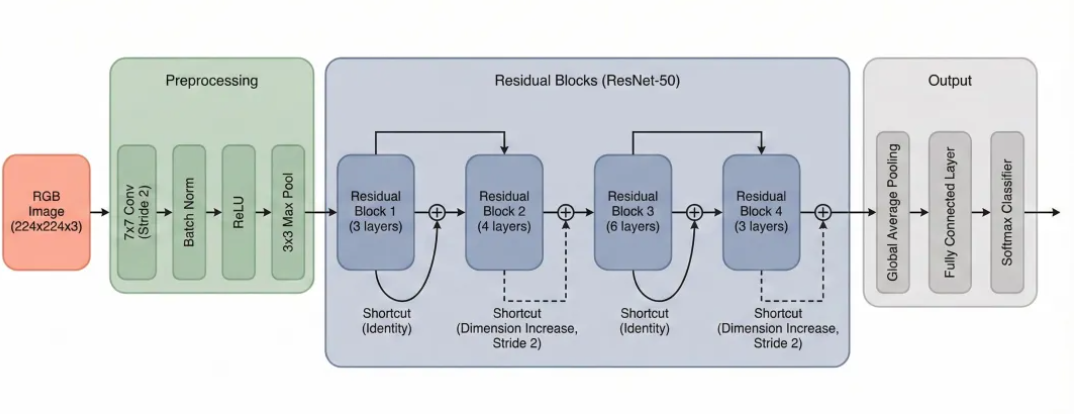
二、 场景一:技术路线图 (Technical Roadmap)
1. 架构搭建:自顶向下 (Top-Down Approach)
2. 逻辑连接:动态与分组
3. 配色美学:克制与高亮
三、 场景二:实验流程图 (Experimental Flowchart)
表现形式:拟物与扁平的平衡
排版细节:视觉暗示严谨性
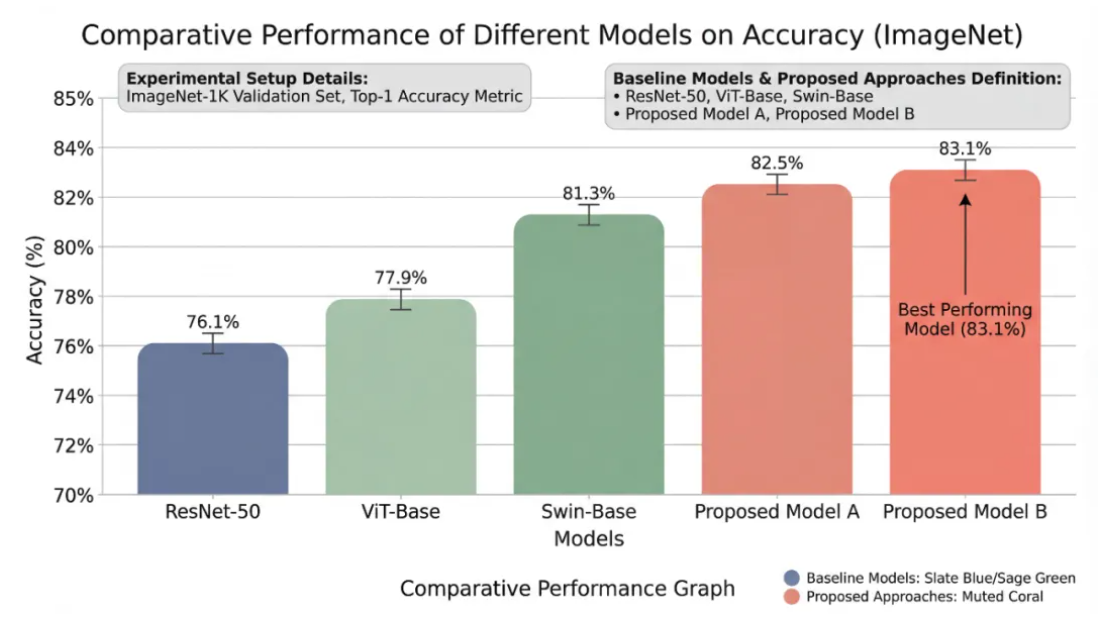
四、 场景三:学术海报 (Academic Poster)
1. 规格设置:专业出版标准
2. 布局策略:经典三栏式
3. 细节优化:少即是多
五、 总结与延伸
AI绘图辅助 Prompt (提示词) 参考
(User: fill the {} with your paper’s content; keep the structure, do not delete sections.)
If they connect specific modules, explicitly write:
If none, write “None”.}
Only fill if you want experimental plots, tables, or multiple pipelines instead of (or in addition to) a pure architecture diagram.
“Accuracy: {value} vs baselines”,
“RMSE: {ours} vs {baseline A} vs {baseline B}”,
“Speed vs Performance curve”.
Use structured numbers or short text; one metric/comparison per line.}
“Rows: {methods}”,
“Columns: {datasets / metrics}”,
“Highlight: {our method row}”.}
Use this to constrain branches, merges, and grouping. This will directly affect the layout.
Generate the final diagram strictly according to the user-filled content in the {} placeholders and the structural rules above. Do not add new modules or mechanisms beyond what is specified.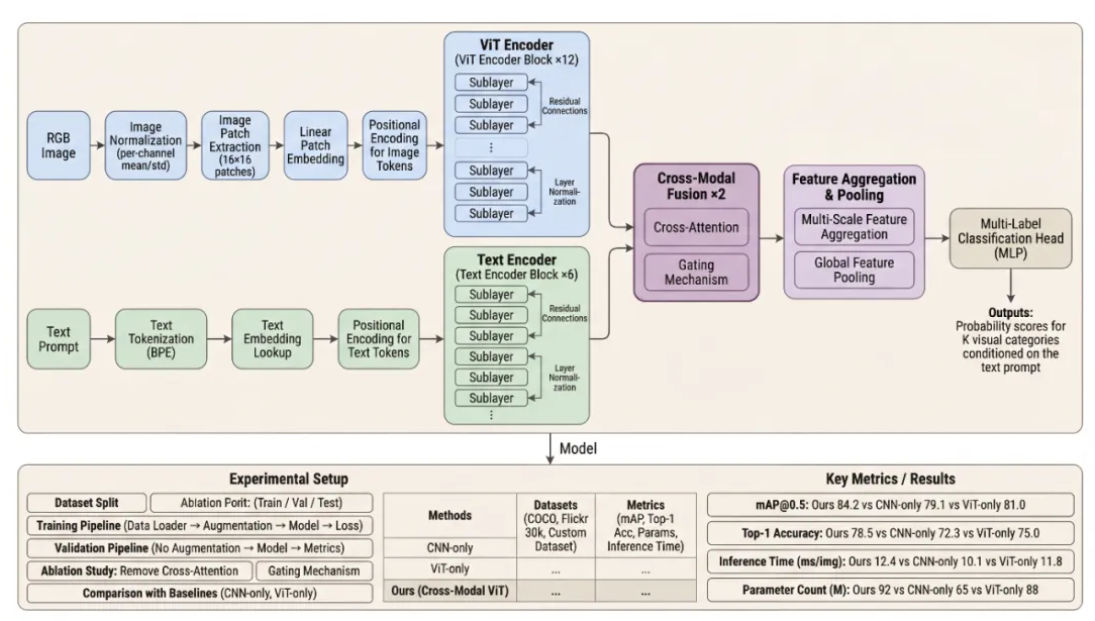
附:解锁 Nano Banana Pro 绘图能力
1. Gemini 官方应用 (主流渠道)
2. NotebookLM
3. 零代码直出——灵芽AI创意工坊
4. 开发者集成——灵芽API 直连 banana Pro
灵芽API banana 大模型核心功能亮点对比
功能特性 Nano Banana (基础版) Nano Banana Pro (专业版) 底层模型 Gemini 2.5 Flash Image Gemini 3 Pro Image 最大分辨率 1024 x 1024 最高 4K 文字渲染 基础单词/短句 长段落、多语言、精准排版 角色一致性 较好 极佳 (支持锁定多达 5 个角色) 专业控制 基础滤镜/修补 可调光影、焦距、相机角度